Forgotten Password
If you forget your password, you can reset your password on-demand:

If you forget your password, you can reset your password on-demand:
From the Okta login page, click “Need help signing in?”.

Click “Forgot password?”.

Enter your email or username and choose to reset via SMS (if you set up a phone) or reset via e-mail. If you do not have access to either, please contact the Walsh Help Desk by email at helpdesk@walshcollege.edu or by phone at 248-823-1350.
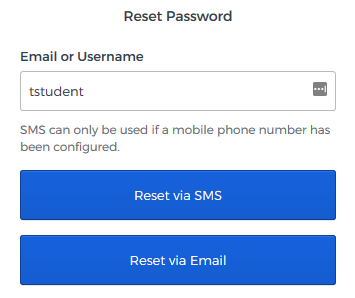
You will be notified that the password reset instructions have been sent to the destination you chose.

Click the “Reset Password” button in the instructions that you received.

Answer your security question and click “Reset Password”

Enter a new password twice and then click “Reset Password”.

Walsh College is implementing new technology systems to better serve our students and improve the overall student experience. During this transition, you may experience occasional delays in reaching certain offices or receiving responses.
Thank you for your patience as we complete these important improvements. We appreciate your understanding and remain committed to providing you with exceptional service.